

What Happens When Your Business Doesn’t Have a Backup and Disaster Recovery Plan?
Introduction: Could Your Business Recover Today?
Imagine arriving at work on a Monday morning only to discover that your company’s customer database, financial records, and important project files have disappeared overnight. Your employees cannot access critical systems, customers are waiting for responses, and your team has no idea how long it will take to restore operations.
The cause? A ransomware attack that encrypted your business data and brought everything to a standstill.
Now ask yourself: Could your business recover today?
For many small and medium-sized businesses, the answer is uncertain. While most companies understand that their data is valuable, many do not have a reliable strategy to protect it. They assume data loss is something that happens to larger organizations or believe that simply saving files to a hard drive or cloud folder is enough.
Unfortunately, unexpected events happen every day. Hardware can fail. Employees can accidentally delete important files. Cybercriminals can launch ransomware attacks. Natural disasters can damage physical equipment. Without a proper backup and disaster recovery plan, your business may have no reliable way to recover quickly when something goes wrong.
Partnering with a reliable managed IT services provider can help your business proactively protect its systems, monitor risks, and maintain business continuity
A data loss event is not just an IT problem. It can become a financial problem, an operational problem, and even a business survival problem.
A strong backup and disaster recovery plan gives your organization the ability to protect critical information, restore operations, and continue serving customers even after a major disruption.
What Is a Backup and Disaster Recovery Plan?
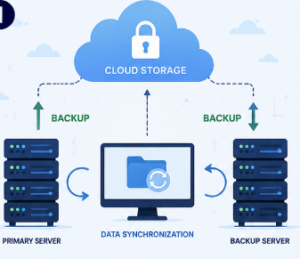
A backup and disaster recovery plan is a strategy that helps businesses protect their important data and restore their technology systems after unexpected events.
It combines two essential components:
Backup is the process of creating copies of your business data and storing those copies securely. These backups allow you to recover files if the original data is lost, damaged, corrupted, or deleted.
Disaster recovery is the process of restoring your systems, applications, and operations after a disruption. It focuses on getting your business running again as quickly and efficiently as possible.
Business can simplify this process by implementing professional business backup and recovery solutions designed to protect critical business data and ensure important files are available when they are needed most
A complete backup and disaster recovery plan typically includes:
- Identifying critical business data and systems
- Creating regular backups
- Storing backups securely
- Establishing recovery procedures
- Testing recovery processes
- Assigning responsibilities during emergencies
The goal is simple: minimize downtime, reduce data loss, and help your business continue operating when unexpected problems occur.
Why Businesses Need Both Backup and Disaster Recovery
One of the biggest misconceptions among business owners is that backup and disaster recovery are the same thing. They are connected, but they serve different purposes.
A backup protects your information by creating copies of your data. However, having backups alone does not guarantee that your business can quickly recover after a disaster.
For example, imagine your company has daily backups of its files. A ransomware attack occurs and locks your entire network. While your files may exist in a backup system, you still need a recovery process to restore systems, remove threats, verify data integrity, and get employees working again.
This is where disaster recovery becomes essential.
Think of it this way:
- Backup answers: “Do we have copies of our data?”
- Disaster recovery answers: “How quickly can we restore our business operations?”
Businesses need both because protecting data is only part of the solution. The ability to recover and resume normal operations is what keeps a company moving forward.
What Happens Without a Backup and Disaster Recovery Plan?

This is where businesses often experience the greatest risk. Without a proper backup and disaster recovery plan, even a minor incident can create serious consequences.
1. Data Loss Can Stop Your Business Operations
Your business depends on data every day. Customer information, financial documents, employee records, contracts, inventory details, and project files are essential to your operations.
Without reliable backups, lost data may be impossible to recover.
Common causes of data loss include:
- Accidental file deletion
- Hardware failure
- Cyberattacks
- Software problems
- Lost or stolen devices
- Natural disasters
For some businesses, losing years of important information could significantly impact their ability to operate.
2. Financial Loss from Extended Downtime
Downtime is expensive.
When your systems are unavailable, employees cannot work efficiently, customers may not receive service, and revenue opportunities may disappear.
The costs of downtime can include:
- Lost sales
- Reduced employee productivity
- Emergency IT expenses
- Delayed projects
- Missed deadlines
- Customer compensation costs
A well-designed backup and disaster recovery plan helps reduce the amount of time your business spends offline.
3. Lost Customers and Business Opportunities
Customers expect businesses to be reliable. If your company cannot access customer records, process orders, respond to inquiries, or provide services, customers may look elsewhere.
A single major outage can affect customer confidence, especially if there is no clear communication or recovery timeline.
Business continuity is not only about technology; it is about maintaining trust.
4. Legal and Compliance Problems
Many businesses handle sensitive information, including customer details, employee records, financial information, and confidential documents.
Depending on your industry, losing or failing to protect this information could create compliance challenges.
A proper backup and disaster recovery plan helps businesses improve data protection practices by ensuring information is securely stored and recoverable.
5. Reputation Damage
A company’s reputation takes years to build but can be damaged quickly after a major data incident.
Customers, partners, and employees want to know that a business takes security seriously.
A business that cannot recover quickly after an incident may appear unreliable or unprepared.
Having a recovery strategy demonstrates that your organization takes resilience and customer protection seriously.
Real-World Scenarios That Can Disrupt Your Business
Many business owners think disasters are unlikely until they experience one. The reality is that disruptions happen in many forms.
Hardware Failure
Servers, computers, and storage devices can fail without warning. Even newer equipment can experience unexpected problems.
Without backups, recovering lost information from failed hardware can be expensive and time-consuming.
Ransomware Attacks
Ransomware is one of the biggest threats facing businesses today. Cybercriminals encrypt company data and demand payment to restore access.
According to the Cybersecurity and Infrastructure Security Agency (CISA), ransomware remains one of the most significant cybersecurity threats affecting organizations of all sizes.
A comprehensive cybersecurity strategy for businesses can help reduce exposure to ransomware and other cyber threats by strengthening security controls, protecting sensitive data, and identifying potential risks before they become major incidents.
A secure backup and disaster recovery plan allows businesses to restore systems without relying on attackers.
Flood, Fire, or Natural Disasters
Physical disasters can damage office equipment and prevent employees from accessing critical systems.
Cloud-based backups and off-site recovery solutions ensure that business data remains available even if the physical workplace is affected.
Human Error
Employees make mistakes. A file can be deleted accidentally, incorrect information can overwrite important documents, or an email attachment can introduce malware.
A reliable recovery solution provides a safety net when human errors occur.
Accidental Deletion
Sometimes important files disappear simply because someone clicks the wrong button.
Without a backup system, recovering deleted information may not be possible.
How to Build an Effective Backup and Disaster Recovery Plan
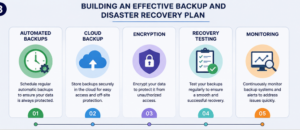
Creating a strong plan does not have to be complicated. Businesses can start by following these practical steps.
1. Identify Your Most Important Data
Not every file or system has the same importance.
Determine which information your business cannot operate without, such as:
- Customer databases
- Financial records
- Business applications
- Employee information
- Contracts and documents
Prioritize protecting your most critical assets.
2. Determine Your Recovery Goals
Every business should understand how quickly it needs to recover after an incident.
Two important considerations are:
- Recovery Time Objective (RTO): How quickly should systems be restored?
- Recovery Point Objective (RPO): How much data loss can your business tolerate?
These goals help determine the right backup frequency and recovery strategy.
3. Choose the Right Backup Solution
Businesses should consider solutions that match their needs, including:
- Automated backups
- Cloud-based backup solutions
- Secure off-site storage
- Managed backup services
The right solution depends on your company size, industry requirements, and operational needs.
4. Create Documented Recovery Procedures
During a disaster, confusion slows recovery.
A documented recovery plan should explain:
- Who is responsible for recovery tasks
- Which systems should be restored first
- How employees should respond
- How communication will be handled
5. Test Your Backup and Recovery Process
A backup is only valuable if it works when you need it.
Regular testing ensures that your data can actually be restored and identifies problems before an emergency occurs.
Backup and Disaster Recovery Best Practices
A successful backup and disaster recovery plan requires ongoing attention. Follow these best practices:
Test Backups Regularly
Do not assume backups are working. Schedule regular tests to confirm that files and systems can be restored properly.
Use Cloud Backups
Cloud-based backup solutions provide secure storage and easier recovery options during emergencies.
Many organizations are adopting cloud solutions for business to improve flexibility, security, and accessibility.
According to Microsoft, implementing cloud-based business continuity solutions can help organizations improve resilience and maintain operations during unexpected disruptions.
Automate Backups
Manual backups are often forgotten. Automated backups ensure your data is protected consistently.
Encrypt Sensitive Data
Encryption protects your information from unauthorized access, both during storage and transfer.
Keep Multiple Backup Copies
A common best practice is following the 3-2-1 backup approach:
- Keep three copies of your data
- Store backups on two different types of media
- Keep one copy off-site
Monitor Backup Activity
Regular monitoring helps identify failed backups, unusual activity, or potential security issues.
Frequently Asked Questions About Backup and Disaster Recovery
1. Is a backup and disaster recovery plan only necessary for large businesses?
No. Small and medium-sized businesses often need these plans the most because they may have fewer resources available to recover after a major incident.
2. How often should my business back up its data?
Backup frequency depends on how often your data changes and how much information your business can afford to lose. Many businesses use automated daily backups or more frequent backups for critical systems.
3. Are cloud backups secure?
When properly configured, cloud backups can provide strong security through encryption, access controls, and monitoring. They are often an important part of modern business recovery strategies.
4. Is having antivirus software enough to protect my business?
No. Antivirus tools help prevent certain threats, but they do not replace a complete backup and disaster recovery plan. Security protection and recovery planning work together.
5. How long does it take to recover after a disaster?
Recovery time depends on the severity of the incident, the size of your systems, and the effectiveness of your recovery plan.
6. Can a managed IT provider help with backup and disaster recovery?
Yes. Managed IT providers can help businesses design, implement, monitor, and test backup and recovery solutions tailored to their needs.
Conclusion: Protect Your Business Before Disaster Strikes
Every business depends on technology, and every business faces risks. Whether it is ransomware, hardware failure, human error, or a natural disaster, unexpected events can interrupt operations and threaten business continuity.
A reliable backup and disaster recovery plan provides more than data protection. It gives business owners confidence knowing that their company can recover when challenges occur.
The difference between a temporary setback and a major business disruption often comes down to preparation.
Don’t wait until disaster strikes to realize the importance of protecting your business. A reliable backup and disaster recovery plan can mean the difference between a temporary setback and a permanent business closure.
If you are looking to strengthen your data protection strategy, Straten Solutions can help you implement backup and recovery solutions tailored to your business needs.