What Does an MSP Actually Do for a Small Business?
Imagine your employees arrive at work on Monday morning and immediately start running into problems.
The network is slow. Several computers cannot connect. Your email isn’t working properly. A critical application keeps crashing, and nobody knows why. Your business owner is asking when everything will be fixed, while employees are losing valuable time trying to troubleshoot issues themselves.
Now imagine there is no dedicated IT team to handle it.
For many small businesses, this situation is more common than it should be. Technology has become essential to everyday operations, but hiring a full-time IT department can be expensive and difficult to manage.
This is where an MSP, or Managed Service Provider, can help.
But what does an MSP actually do for a small business?
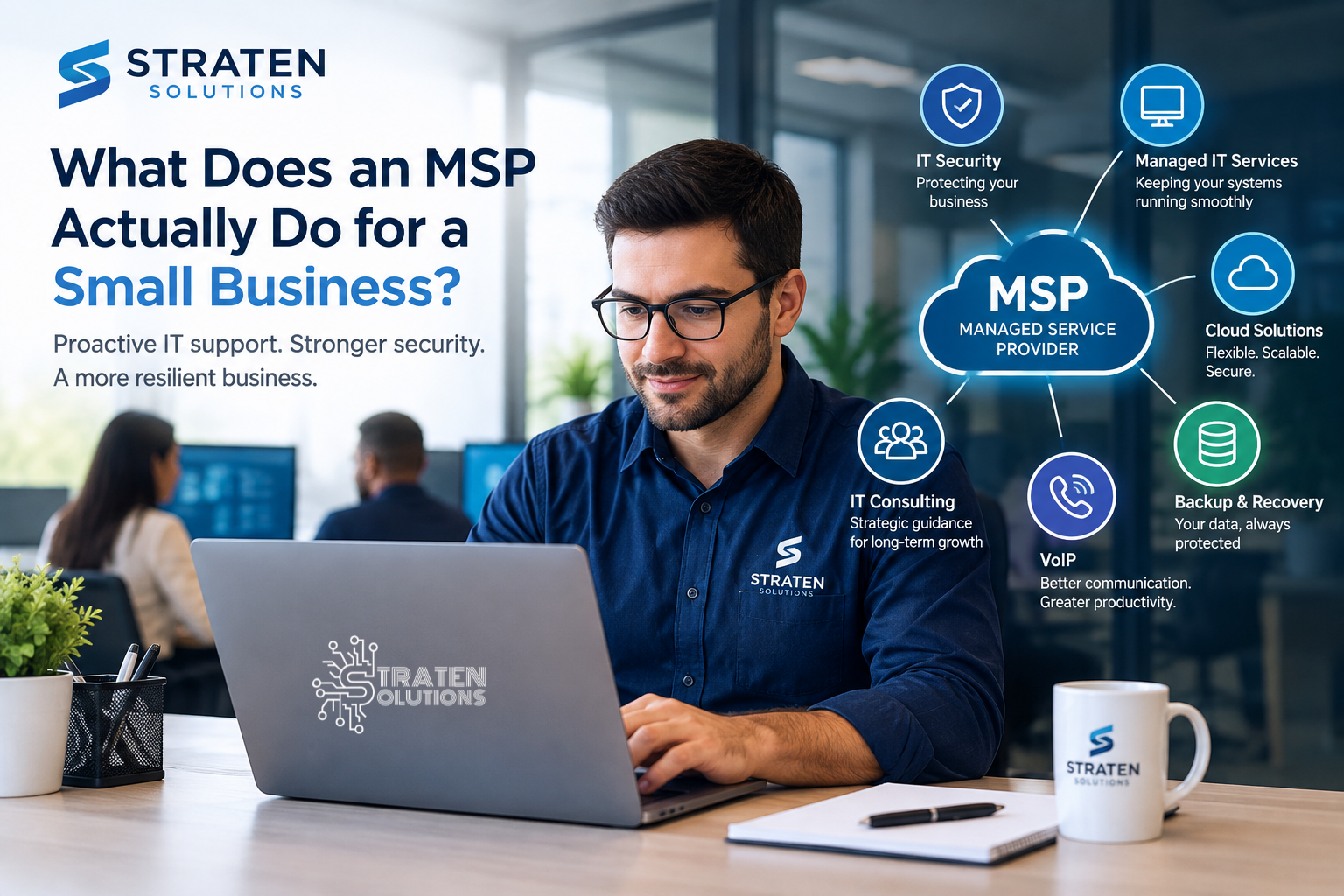
An MSP provides ongoing managed IT services, support and management designed to keep a company’s technology secure, reliable, and running smoothly. Instead of waiting until something breaks, an MSP takes a proactive approach by monitoring systems, addressing potential problems, managing security, supporting employees, and helping businesses plan for future technology needs.
For a small business, the right MSP can become an extension of the team—handling the technical side of the business so employees and leadership can focus on running and growing the company.
What Is an MSP?
An MSP (Managed Service Provider) is a company that manages some or all of a business’s IT needs on an ongoing basis.
Rather than calling an IT technician only when something goes wrong, businesses typically work with an MSP under a recurring service agreement. The MSP continuously monitors, maintains, supports, and manages the company’s technology.
Depending on the provider and the business’s needs, an MSP may manage:
- Computers and employee devices
- Business networks
- Servers and infrastructure
- Cloud services
- Cybersecurity
- Data backups
- Software and system updates
- User accounts and access
- Business communications
- IT planning and consulting
- Help desk and technical support
The exact services vary from one MSP to another, but the overall goal is straightforward: keep your business technology working, secure, and aligned with your business needs.
For a small business without a dedicated IT department, this can provide access to professional IT expertise without the cost and complexity of building a large internal team.
What Does an MSP Actually Do for a Small Business?
An MSP can take care of many of the technical responsibilities that business owners and employees often struggle to manage themselves.
Here are some of the most important things an MSP can do.
1. Monitor Your IT Systems
One of the biggest differences between managed IT services and traditional break-fix support is ongoing monitoring.
Instead of waiting for employees to report that something has stopped working, an MSP can monitor important systems for signs of problems.
This may include:
- Network performance
- Servers
- Computers and devices
- Storage capacity
- System health
- Security alerts
- Backup systems
- Critical applications
Monitoring allows potential problems to be identified earlier.
For example, if a server begins experiencing storage issues, an MSP may be able to address the problem before the storage becomes completely full and causes an application or business system to fail.
2. Provide Help Desk and Technical Support
Employees inevitably encounter technology problems.
A computer may stop connecting to the network. An employee may have trouble accessing an application. A printer may refuse to cooperate five minutes before an important meeting.
An MSP provides a point of contact for these technical issues.
Instead of asking employees to troubleshoot problems themselves or relying on whoever in the office “knows a little about computers,” they can contact IT support and receive professional assistance.
This can reduce employee downtime and allow staff to get back to work more quickly.
3. Manage Computers and Devices
Businesses often have numerous computers, laptops, mobile devices, and other equipment that need to be maintained.
An MSP can help manage these devices throughout their lifecycle.
This may involve:
- Setting up new computers
- Installing necessary software
- Applying updates
- Managing security settings
- Troubleshooting problems
- Removing outdated applications
- Tracking devices
- Preparing equipment for new employees
Proper device management also helps businesses maintain more consistent security and performance across their workforce.
4. Keep Software and Systems Updated
Outdated software isn’t just inconvenient. It can also create security and compatibility problems.
Software vendors regularly release updates that fix bugs, improve performance, and address security vulnerabilities.
An MSP can help ensure that important systems and applications are updated appropriately.
This is especially valuable for small businesses where employees may not have the time or technical knowledge to keep track of updates across dozens of devices.
5. Strengthen Cybersecurity
Cybersecurity is no longer something only large corporations need to worry about.
Small businesses can also be attractive targets because attackers know that many smaller organizations have limited security resources.
An MSP can strengthen your IT security by helping businesses establish and maintain security measures such as:
- Endpoint protection
- Firewall management
- Multi-factor authentication
- Access controls
- Security monitoring
- Software patching
- Email security
- Employee security practices
- Security assessments
The specific protections a business needs depend on its environment, industry, and risk profile.
Businesses looking to strengthen their cybersecurity practices can also review the NIST Cybersecurity Framework for guidance on managing cybersecurity risk.
The important point is that cybersecurity should be treated as an ongoing process rather than a one-time installation.
An MSP Can Help With Cloud Services
Cloud technology has changed how businesses store information, use applications, and support employees.
Employees may need to access files and applications from different locations, while businesses may rely on services such as Microsoft 365 and other cloud-based platforms.
An MSP can help businesses determine which cloud solutions make sense and manage those environments once they are implemented.
This may include:
- Cloud migration planning
- Cloud application management
- User access management
- Cloud security
- Microsoft 365 management
- Remote workforce support
- Cloud backup
- Troubleshooting cloud applications
Instead of adopting cloud technology without a plan, businesses can work with an IT provider to make sure their technology supports the way they actually operate.
An MSP Helps Protect Business Data
Data is one of a company’s most valuable assets.
Customer information, financial documents, contracts, employee records, project files, and other business information can be difficult or impossible to replace if they are lost.
An MSP can help establish a backup and recovery strategy designed to protect critical business information.
A strong strategy may include:
- Automated backups
- Multiple backup copies
- Off-site or cloud backups
- Backup monitoring
- Encryption
- Regular recovery testing
- Documented recovery procedures
Simply having a backup isn’t enough. Businesses also need confidence that their data can actually be recovered when something goes wrong.
What Happens When Something Goes Wrong?
One of the biggest benefits of working with an MSP is having someone to turn to when an IT problem occurs.
Consider a ransomware incident.
Employees suddenly cannot access important files. A critical application is unavailable, and there is uncertainty about what happened.
Without professional IT support, employees may waste valuable time trying to figure out the problem themselves.
An MSP can help with incident response, containment, recovery, and determining what steps need to be taken to prevent similar problems in the future.
The same applies to other situations, such as:
- Hardware failures
- Network outages
- Accidental data deletion
- Software failures
- Lost devices
- Email problems
- Connectivity issues
- Security incidents
The goal isn’t simply to fix the immediate problem. It is to restore operations while reducing the likelihood of the same problem happening again.
An MSP Helps Businesses Plan Instead of Guessing
IT decisions can be difficult for a business owner who isn’t an IT professional.
Should you replace your computers this year?
Should you move certain systems to the cloud?
Is your network secure enough?
How much should you budget for technology?
Do you need new software?
What happens if your primary server fails?
An MSP can provide IT consulting and help answer these questions based on the company’s current environment and future goals.
Instead of purchasing technology simply because it is new or inexpensive, businesses can make decisions based on factors such as security, productivity, scalability, compatibility, and long-term cost.
MSP vs. Hiring an In-House IT Team
An MSP isn’t necessarily a replacement for every internal IT department. Larger organizations may benefit from having dedicated IT employees.
For many small businesses, however, hiring and maintaining a full internal IT department may not be practical.
An MSP can provide access to a broader range of technical expertise without requiring a business to hire several specialized employees.
For example, a small company might need expertise in:
- Networking
- Cybersecurity
- Cloud computing
- Backup and recovery
- Hardware
- Software
- IT strategy
Finding one employee who is highly skilled in every one of these areas can be difficult.
An MSP can provide access to a team with different areas of expertise.
What Are the Benefits of Using an MSP?
For small businesses, the benefits go beyond simply having someone to call when a computer stops working.
Reduced Downtime
Monitoring and proactive maintenance can help identify problems before they cause significant disruption.
Better Security
Professional IT management can help businesses implement security controls and maintain them over time.
Small businesses can also review CISA cybersecurity resources for small businesses for practical guidance on improving their security practices.
More Predictable IT Costs
A managed service agreement can make IT expenses more predictable than relying entirely on unexpected break-fix expenses.
Improved Employee Productivity
Employees can spend less time troubleshooting technology and more time doing their actual jobs.
Access to IT Expertise
Businesses can gain access to professionals with experience across multiple technology areas.
Better Technology Planning
An MSP can help businesses make technology decisions based on current needs and future growth.
How to Know If Your Business Could Benefit From an MSP
Not every business needs the same level of IT support.
However, an MSP may be worth considering if your business experiences several of these problems:
- Employees frequently experience computer or network issues.
- IT problems regularly interrupt productivity.
- Nobody is responsible for monitoring your systems.
- Your business relies on one employee for all IT knowledge.
- Software and devices aren’t consistently updated.
- You are unsure whether your business is properly protected against cyber threats.
- Your backups aren’t regularly tested.
- You don’t have a clear disaster recovery strategy.
- IT expenses are unpredictable.
- Your business is growing and technology needs are becoming more complicated.
- You don’t have the internal expertise to plan your technology strategy.
These are signs that technology may be becoming a business risk rather than simply a business tool.
How to Choose the Right MSP
Choosing an MSP is an important decision because the provider may have access to your systems, devices, applications, and sensitive business information.
Before choosing one, ask potential providers about:
- What services are included?
- How quickly do they respond to support requests?
- Do they provide 24/7 monitoring?
- How do they approach cybersecurity?
- How are backups managed and tested?
- What happens during a major outage?
- Do they provide cloud services?
- Can they support your business as it grows?
- What is included in the monthly agreement?
- How do they communicate with clients?
- Do they provide strategic IT consulting?
The cheapest provider isn’t necessarily the best choice. Businesses should consider the provider’s experience, security practices, responsiveness, range of services, and ability to understand their specific business needs.
Frequently Asked Questions About MSPs
What does MSP stand for?
MSP stands for Managed Service Provider. An MSP provides ongoing technology management and support for businesses, often through a recurring service agreement.
Is an MSP only for large businesses?
No. MSPs can be particularly useful for small and medium-sized businesses that don’t have the resources or need for a large internal IT department.
How much does an MSP cost?
The cost varies depending on factors such as the number of users and devices, services required, security needs, infrastructure, and support requirements. Businesses should evaluate the overall value and services included rather than comparing monthly prices alone.
Does an MSP replace an internal IT employee?
Not necessarily. An MSP can supplement an internal IT employee or department by providing additional expertise and resources. For smaller companies, an MSP may provide most or all of their IT support.
Does an MSP provide cybersecurity?
Many MSPs provide cybersecurity services, although the specific protections vary between providers. Businesses should ask what security monitoring, endpoint protection, access controls, backup, and other security services are included.
Can an MSP help with cloud services?
Yes. Depending on the provider, an MSP can help businesses plan, migrate, secure, and manage cloud environments and applications.
Is an MSP worth it for a small business?
For many small businesses, an MSP can provide valuable access to professional IT expertise, proactive monitoring, cybersecurity, backup management, technical support, and strategic planning without requiring a large internal IT department.
Conclusion
So, what does an MSP actually do for a small business?
The answer goes far beyond fixing broken computers.
A good MSP helps businesses manage, maintain, secure, and plan their technology. From monitoring networks and supporting employees to protecting business data, managing cloud services, improving cybersecurity, and helping leadership make smarter technology decisions, an MSP can become an important part of a company’s operations.
Most importantly, effective IT management shouldn’t begin after something goes wrong.
When technology is managed proactively, businesses have a better opportunity to identify problems early, protect important information, reduce disruptions, and make technology work for the business rather than against it.
Don’t wait until a major IT problem forces your business to rethink how technology is managed. Straten Solutions can help you build and manage an IT environment tailored to your business needs, from managed IT services and cybersecurity to cloud solutions, backup and recovery, VoIP, and IT consulting.
Ready to take IT off your shoulders and focus on growing your business? Contact Straten Solutions to discuss how the right IT strategy can support your business.